September 24, 2026 · 8 min read · Agentive Scale
NFC Google Review Card and QR Poster: Are They Worth It?
An NFC card and QR poster remove the search step between a good customer experience and a Google review. Here is how to use them without breaking Google's rules.
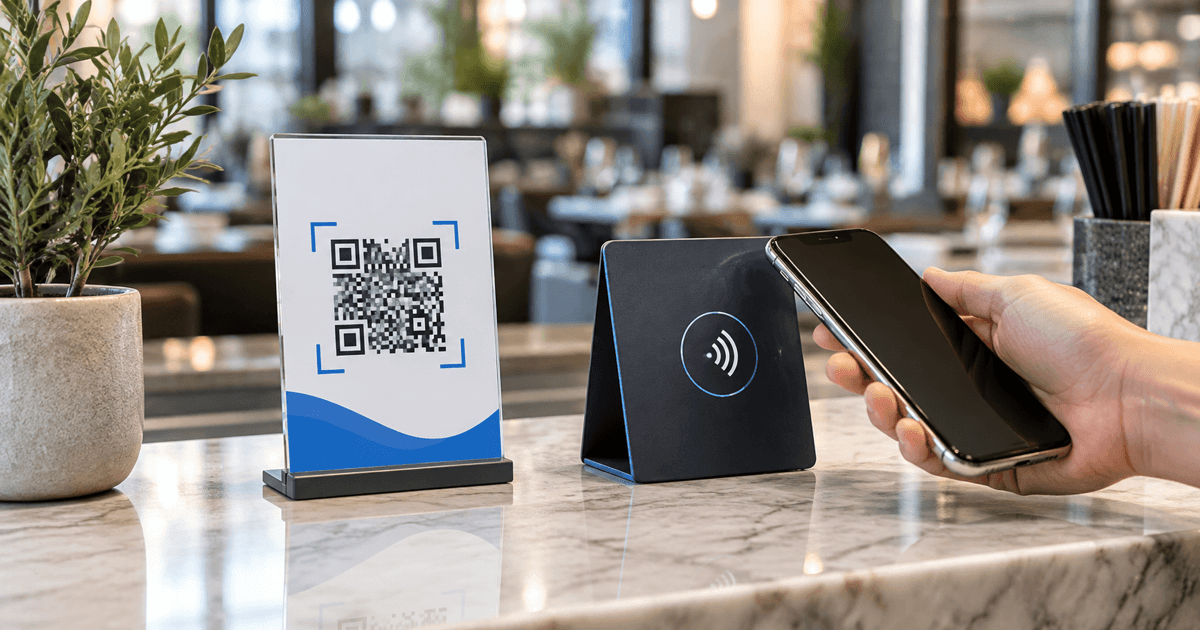
Most satisfied customers do not leave a review because the process has too many small steps. They must remember later, search for the business, choose the correct location, open the review form and finally write something. An NFC Google review card and QR poster remove the search step. A customer taps or scans and reaches the correct review screen.
That convenience is the product. The card does not create reviews, write them or guarantee five stars. It turns a vague request such as “please find us on Google later” into a clear action at the moment the customer is ready.
For restaurants, salons, clinics, auto services, gyms, hotels and retail counters, a combined NFC and QR stand usually costs roughly $20–$80 per location, depending on size, material, customization and whether the link can be updated. Portable cards may cost less. Large acrylic stands, branded designs and multi-location dashboards cost more.
What happens when the customer taps or scans?
The NFC chip stores a web address. A compatible phone reads it from a short distance and shows a notification. The QR code stores the same destination in a visual format that the phone camera reads. Both should open the direct Google review link for the correct Business Profile, rather than a homepage or a generic Maps search.
No dedicated app should be required. The customer still chooses whether to continue, selects a rating and writes the review in their own Google account. The device does not access a payment card, contact list or private phone data merely because the user taps an NFC tag.
A QR fallback matters. Some people keep NFC disabled, use an older phone, do not recognize the tap symbol or simply trust the camera more. Other customers prefer a tap because it avoids framing a code. The two methods solve the same problem for different habits.
Card, table stand or poster?
Portable NFC card. A staff member can present it after completing a service. It works well for mobile teams, photographers, cleaners, tradespeople and a restaurant server who closes the interaction at the table. The weakness is operational: a card kept in a drawer generates nothing.
Counter or reception stand. This is usually the strongest format for a location with a defined checkout or exit point. It stays visible beside the card terminal, reception desk or pickup counter. A durable acrylic or PVC stand can carry both NFC and QR.
QR poster or window sticker. A larger prompt works in a waiting area, near the exit, on a hotel reception wall or on a printed receipt. It does not depend on NFC hardware and can serve several customers at once. The QR code must remain large, high-contrast and physically reachable enough to scan.
Take-home card or receipt insert. This gives the customer time to review later but loses the immediacy of the experience. It is useful when asking on the premises would interrupt a sensitive consultation or when the decision maker is not present.
The best system often uses a permanent NFC+QR stand at the natural end of the visit and a review link in the follow-up message. More touchpoints do not mean repeated pressure; they give the customer a convenient option.
How much does an NFC review system cost?
Prices vary more by production and service than by the NFC chip itself. A blank tag is inexpensive. The commercial value comes from correct programming, a stable direct link, a readable design, durable material, delivery and support when a location or profile changes.
| Format | Typical one-time range | Best use |
|---|---|---|
| Basic portable card or sticker | $10–$30 | Mobile staff or occasional requests |
| Branded NFC + QR counter stand | $25–$80 | Checkout, reception, table or front desk |
| Printed QR poster | $5–$30 | Waiting area, wall, window or receipt station |
| Multi-location kit | Custom | Consistent rollout and location-specific links |
Ask whether the link is written directly to the tag or routed through the vendor. A direct review URL can continue without a subscription, but it may require reprogramming if the destination changes. A managed redirect can be edited later and may provide scan counts, but it creates dependence on the vendor's domain and service.
The quote should state what happens if you cancel. Does the card still open the review page? Who owns the redirect and analytics? Can each location use its own profile? Is replacement included if the chip or print fails? A cheap card that opens the wrong location is more expensive than a correctly tested one.
Where should the card or poster be placed?
Placement should match the moment of completed value. At a restaurant, that may be after payment or when a guest compliments the meal. At a salon, it is near the mirror or checkout after the customer sees the result. At a dental practice, it is at reception after the visit, without pressuring someone during treatment.
For an auto repair shop, the request belongs after the technician explains the completed work. For a hotel, reception at checkout may work, while a follow-up email can reach guests who leave quickly. For a gym, the first day is too early; a milestone or helpful staff interaction creates a more genuine moment.
Avoid placing the stand where nobody can comfortably stop. A QR code behind the cashier, under glare or beside a long line produces friction. Test the tap and scan from the actual customer position, under the real lighting, on both iPhone and Android devices.
If a business has multiple locations, every physical piece should link to the matching profile. A customer in one branch reviewing another location creates confusing feedback and weakens operational learning.
The right way to ask
The request should be short, neutral and optional: “If you would like to share your experience, you can tap or scan here.” Staff can mention that feedback helps the business, but should not ask for a particular rating or tell the customer what to write.
Google explicitly permits businesses to share a review link or QR code, including on receipts, in thank-you emails, at the end of a chat and inside the store. Its policy also says reviews must represent genuine experiences. The safe standard is simple: invite real customers without controlling the sentiment.
Do not offer a discount, gift, contest entry or loyalty points in exchange for a review. Do not ask only customers who first select a happy face while sending unhappy customers to a private form. That practice, often called review gating, selectively solicits positive reviews and conflicts with Google's policy.
Do not require staff to collect a quota of five-star reviews or ask customers to include an employee's name. Do not hold the customer's phone or stand over them while they write. A public review is the customer's choice and words.
Negative feedback is not a failure of the system
A neutral request will sometimes produce criticism. That is useful when the business responds professionally and fixes recurring problems. A profile containing only perfect, generic praise can be less persuasive than a realistic history with thoughtful responses.
Create a separate private feedback route for service recovery, but do not use it as a filter before showing the Google option. Every genuine customer should receive the same neutral invitation. A poster can show a support email or “Need help? Speak with us” alongside the review prompt, as long as it does not hide the public-review path from unhappy customers.
When a negative review appears, acknowledge the experience, protect personal information, offer an appropriate next step and investigate the cause. Report a review only when it violates policy; disagreement alone is not a violation.
What should the design say?
The strongest design has one task. Use a short heading such as “Share your experience,” a visible tap symbol, a high-contrast QR code and one instruction. Avoid dense paragraphs, several social icons and exaggerated claims.
Do not design the card to appear as an official Google product. Use your own brand and make the purpose clear. Before printing, verify the QR code at several sizes, test the NFC chip through its final material, and confirm that the destination opens the review form for the correct location.
Consider accessibility. The instruction should be readable without leaning over the counter. The color contrast should remain strong under indoor lighting. A short written URL can provide a final fallback, although it will be used less often.
How to measure whether it works
Record the starting number of reviews, average rating and recent review pace. Then log the installation date for each location. Compare the next eight to twelve weeks with the previous period, while noting seasonality and customer volume.
If the link uses a managed redirect, tap and scan counts can reveal whether placement attracts attention. Those counts are not reviews: a customer may open the form and decide not to publish. The business result is a steady increase in genuine recent feedback, plus operational insights in the comments.
Do not turn the program into a daily pressure campaign. Train staff on the right moment and one neutral sentence. Check whether the stand is visible, clean and functioning. Refresh the prompt when regular customers become blind to it.
Reviews are one part of a complete local presence. Accurate categories, services, hours, photos and responses also matter; our Google Maps ranking guide covers that foundation. The guide to Google Business Profile calls and reviews explains how the profile should turn visibility into action.
Is an NFC card worth it?
It is worth testing when customers finish a real interaction in person and the business currently receives far fewer reviews than customer volume would suggest. One additional customer influenced by stronger social proof may repay a simple stand. The value is lower for businesses with almost no in-person contact, an unverified profile or unresolved service problems.
Start with one visible NFC+QR point per customer journey. Use the direct link for the exact location, ask neutrally, never reward the rating, and review the results after two or three months. For a location audit and a branded NFC/QR review setup, book a short conversation. We can connect the physical prompt to the correct profile and the rest of your local visibility system.
Frequently asked questions
What is an NFC Google review card?
It is a physical card, plaque or stand containing a programmed NFC tag. A compatible phone tap opens the business's Google review page. Good products also include a QR code as a fallback for customers who prefer the camera or have NFC disabled.
Do NFC review cards require a monthly fee?
A simple card or stand usually needs no subscription because it stores a review URL. Some vendors charge for editable links, analytics, multiple locations or a management dashboard, so confirm what continues to work if the subscription ends.
Can a business offer a discount for a Google review?
No. Google prohibits payment, discounts, free goods or services in exchange for a review. The request must be neutral and the review must reflect a genuine experience.
Should a business use NFC or a QR code?
Use both. NFC offers a quick tap on compatible phones, while QR works through the camera and is familiar to more customers. A combined stand prevents one technical preference from blocking the request.
Will an NFC card automatically improve Google Maps ranking?
No device guarantees ranking. It can make it easier for real customers to leave feedback, which may strengthen the profile over time. Local visibility still depends on relevance, distance, prominence and the overall quality of the Business Profile.